

According to NBC News, automated bots now account for 57% of website requests. Of course, not all of that is AI activity, but it points to a broader measurement challenge: traditional analytics can tell us a lot about the people visiting our site and very little about the machines that arrive first. That’s where Microsoft Clarity caught our attention.
Alongside its established user experience and website analytics capabilities, the platform has been developing AI visibility features that help marketers understand how AI crawlers, search engines and assistants interact with their sites. We spent several weeks testing them on our website. Here’s what we found.
Setting up AI visibility features
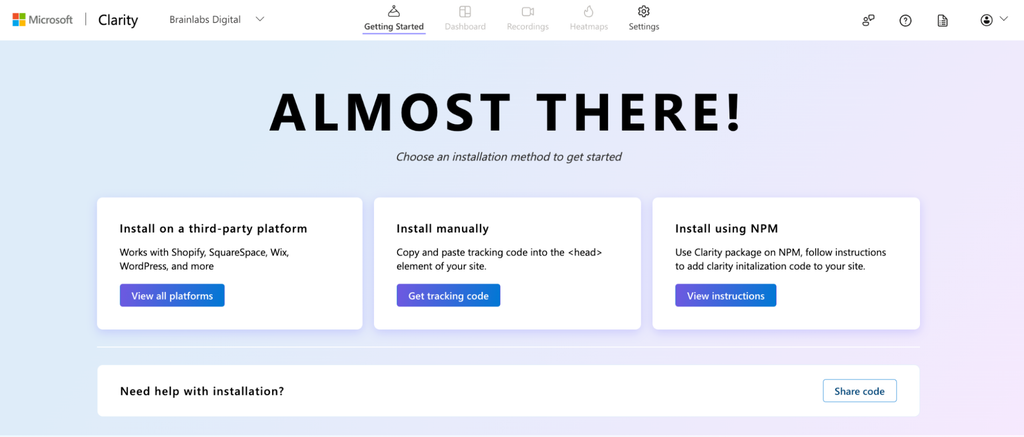
Clarity is free to use, and it was straightforward to get up and running. It required adding a simple tracking script to our website, which took just a few minutes. We installed it directly, although there are also integrations available for platforms like Shopify and WordPress.
Getting the most out of Clarity took a little more work beyond initial setup. Unlocking certain dashboard views required additional integrations. We connected Google Analytics, then configured a WordPress plug-in to bring server-log data into the bot activity dashboard. That second step mattered most, because it surfaced information that would otherwise mean digging through log files.
For anyone exploring the platform, Microsoft’s setup documentation provides a walkthrough of the available installation options.
1. Who’s crawling our site, and why
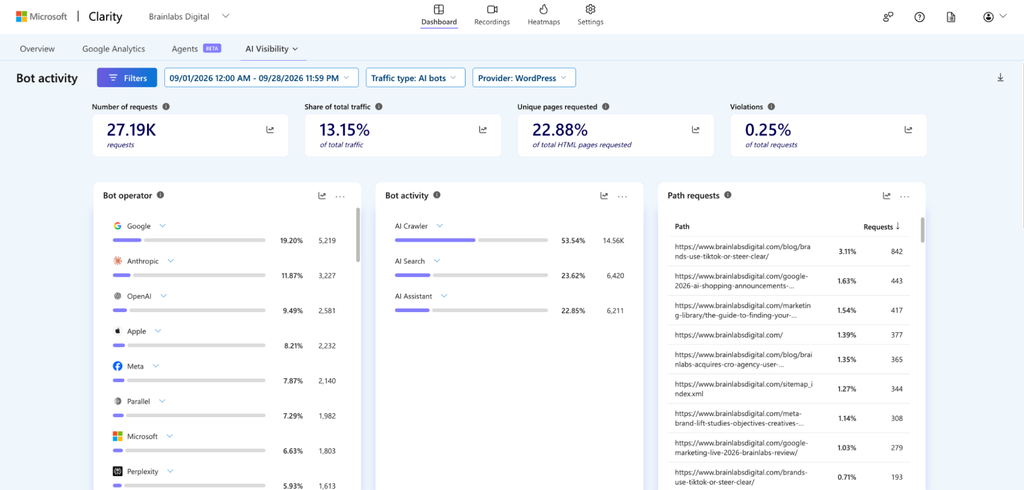
Clarity’s bot activity dashboard sits inside its AI Visibility features. It shows which bots visit, how often, and which pages they request, and it sorts them into three types:
- AI Crawlers revisit sites on a schedule to build or refresh a knowledge base, regardless of any single user query.
- AI Search bots fetch pages in real time because someone just asked a question.
- AI Assistants act on behalf of a specific user, such as checking a price or completing a form.
Those distinctions matter because a bot accessing your website doesn’t necessarily mean somebody is searching for your brand or that your content is being used in an AI-generated answer. Understanding the purpose of that activity gives us a better starting point for interpreting the data.
And we’re already seeing some interesting patterns on our own site. Between September 1 and September 28, 2026, Clarity recorded approximately 27,190 AI bot requests, representing 13.15% of the traffic measured in that dashboard. AI crawlers accounted for 53.54% of those requests, while AI Search and AI Assistant activity represented 23.62% and 22.85%, respectively.
Google, Anthropic and OpenAI were among the most active operators shown in the dashboard, although their request volumes varied considerably.
What happens after a bot visits?
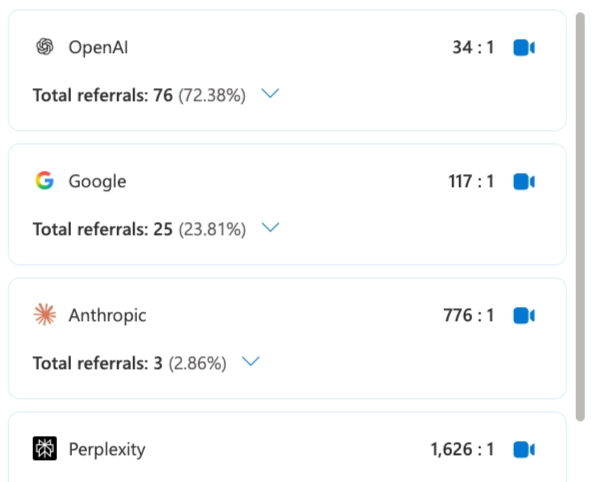
Clarity’s scrape-to-referral ratio compares AI scraping activity with referral visits from AI platforms. Across our period it reported an average ratio of 90:1 and 105 total referrals. Platforms differed sharply: OpenAI sat at 34:1 with 76 referrals, Google at 117:1 with 25, and Anthropic at 776:1 with three.
Those numbers invite conclusions about which platform delivers the most traffic value. Although, referral doesn’t necessarily show what role a platform played in a customer’s decision. We treat the ratio as one more input alongside our traffic, conversion, and visibility data. It’s not necessarily a measure of how often a crawl produces a qualified click.
2. AI citations and topic insights
Topic Insights, still in beta, lets you define a topic and track how often your site is cited when AI platforms answer related prompts. For our branded terms, Clarity showed a citation rate of 72.73% across the tracked prompts and a competitive share of 50%. Our site earned 41 citations, 56.94% of those in the share-of-authority breakdown.
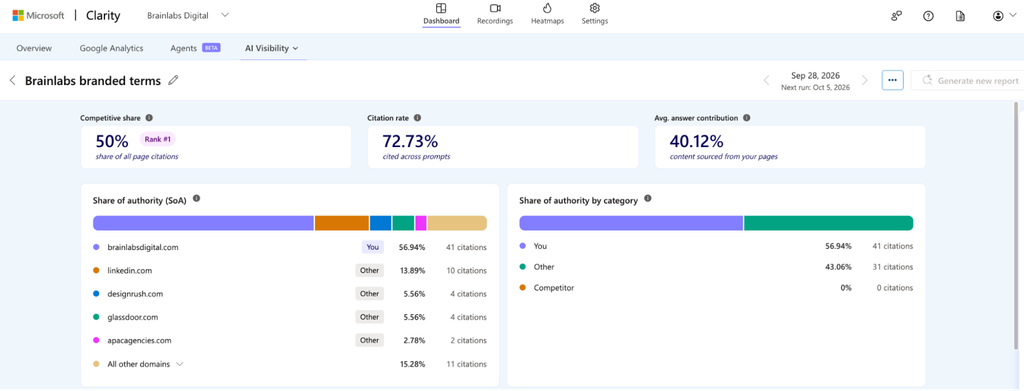
We expected to see strong branded term results as this is commonplace for most sites, so the more useful finding sat within non-branded prompts. When we looked at broader prompts that don’t name us, we found gaps around AI search measurement and agentic enablement, two services we want to be known for.
Since the Topic Insights feature is still in beta, there are some limits. It doesn’t generate prompts for you, and you can only track up to 15 prompts within each topic, so the results are only as good as the prompts you choose. The grounding queries in the Citations tab make a decent starting point, but they reflect where your content already appears, which makes them poor at exposing where you’re absent. You still need broader prompt research, competitive analysis and ongoing validation around whatever Clarity reports. Brainlabs recently published its State of AI Visibility report, where we provide our detailed approach to prioritize and score the most valuable prompts.
3. Connecting technical issues to real sessions
Clarity’s longer-standing analytics turned out to be an actionable part of our test. The dashboard combines Core Web Vitals, JavaScript errors and behavior signals such as dead clicks, rage clicks and excessive scrolling, and each one links through to the related session recordings.
On our site, the performance overview scored 80/100 across 353 pageviews in the selected view, a small sample, so we read it as a snapshot. Largest Contentful Paint was rated good at 2.2 seconds, while Interaction to Next Paint, at 240 milliseconds, was flagged as needing improvement. In the same period, 6.75% of sessions included dead clicks and 2.92% included quick backs.
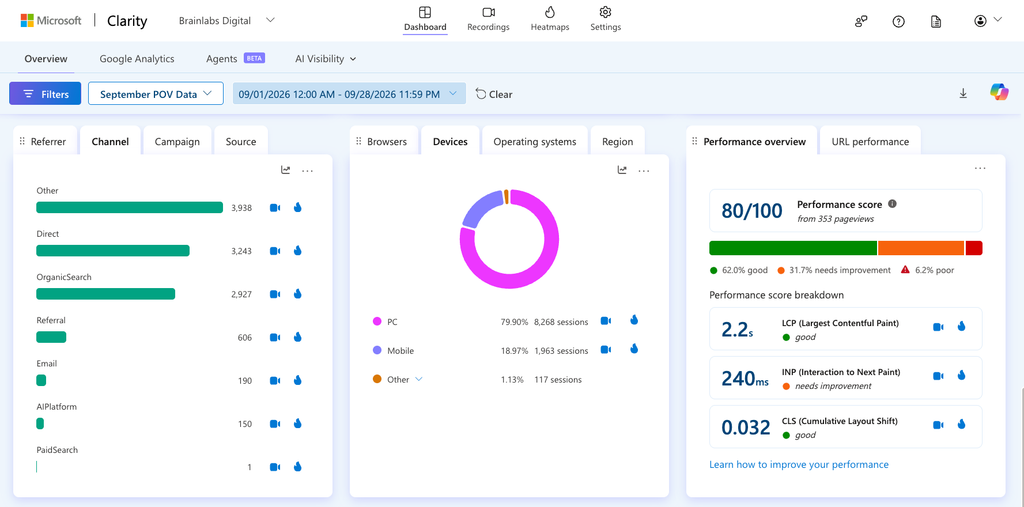
The recordings add a more insightful layer onto these broader performance numbers. An error report says something broke, while a session shows what the visitor was doing when it broke.
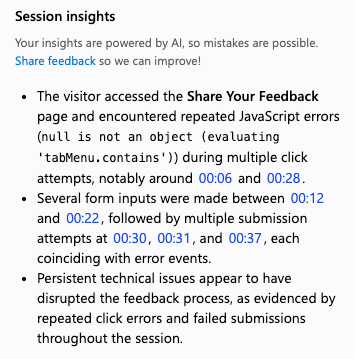
Our client feedback page is a good example. One of our culture codes is “Feedback is a Gift,” so a failing feedback form is a problem we want to find fast. Clarity surfaced a session where a client hit repeated JavaScript errors and made several submission attempts. While this one session didn’t necessarily indicate a trend, it told us exactly where to look.
Expanding our measurement stack
After several weeks of testing, we’ve found that Microsoft Clarity offers a useful additional perspective on how our website is being accessed and used. Google Analytics stays central to our reporting, and our existing AI visibility tools (including Ahrefs, Peec.ai, and seoClarity) keep providing organic performance context. Clarity adds the most insights on bot activity and on connecting site errors to real user behavior.
Many AI visibility features are still in beta, so the quality of the data depends on configuration, the questions you’re trying to answer and how carefully you interpret the results. We’ve also found that some of the most useful information sits a click or two beyond the main dashboards, so there’s a degree of exploration involved in learning where everything lives.
For marketers considering Clarity, we think it’s worth exploring (especially since it’s free!) Our advice would be to start with the questions you’re trying to answer, identify potential gaps in your current measurement stack, connect the relevant data sources and spend some time understanding what each dashboard is actually measuring.