

Every week, a new AI model launches with claims of being “the most advanced” or “the smartest yet.” And every week, we’re left wondering: which one we should actually be using?
I run a 1,000+ person digital marketing agency, and that question matters to us daily. So I spent months testing ChatGPT, Gemini, Claude, and Grok across real work scenarios. Not benchmarks. Not synthetic tests. Actual tasks that matter for running a business at scale.
Here’s what I found about what each LLM is genuinely best at, and when you should reach for which tool.
ChatGPT: The All-Rounder
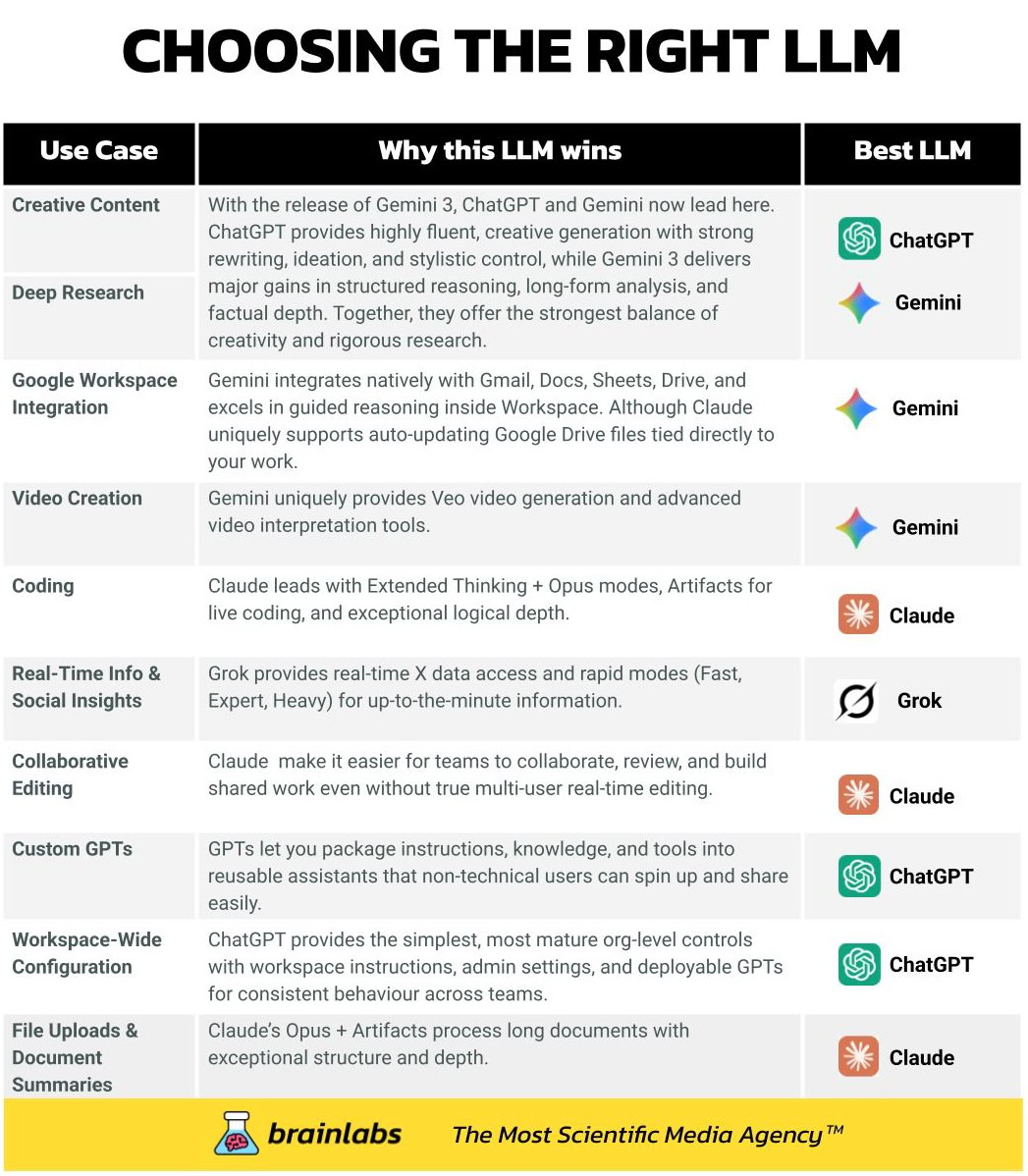
Best for: Creative content generation and deep research.
If you’re only going to use one LLM, ChatGPT is probably it. Not because it’s the best at any single thing, but because it handles the widest range of tasks without forcing you to switch tools.
It’s still my go-to for most work. Last week, I used it to understand what MCP is and how it could apply to my company, generate and adjust visuals for a piece I’m working on, and brainstorm content ideas I want to produce, all in one session without leaving the interface. The four thinking modes let you balance depth against speed depending on what the task needs, and Canvas makes editing feel collaborative rather than like a series of prompts.
The GPTs feature is where it pulls ahead for teams. We’ve built custom bots like the Feynbot which is able to break concepts down to their simplest terms, teach it to you, and then test you on how much you’ve learned before advancing your level. Another custom bot we’ve made analyzes voice notes and transforms them into cleaned transcripts and then curated internal and external content. Build it once, share it across the organization, and stop re-explaining context every time. Custom instructions layer nicely too: workspace defaults and project overrides.
The integration ecosystem is the most extensive we tested: Drive, Gmail, Slack, Notion, Canva, Asana, GitHub, and more.
That said, we hit friction. Drive doesn’t auto-update when files change. GPTs can’t be used inside projects: you have to choose one or the other. And project collaboration isn’t truly shared: teammates end up working in parallel rather than building on each other’s work.
ChatGPT is the generalist. When you need deep reasoning, precise code, or real-time data, you’ll reach for something else.
Gemini: The Google Workspace Native
Best for: Google Workspace integration and video creation.
If your team lives in Gmail, Drive, Docs, and Calendar, Gemini is the only LLM built natively for that ecosystem.
That native integration is genuinely useful. I’ve asked Gemini to find documents I thought were long lost in the depths of my Drive, like a deck from two years ago on data strategy that I only vaguely remembered who I’d shared it with and a few fragments of the content. It found it in seconds, all without leaving the interface or uploading anything. For teams already embedded in Google’s ecosystem, this removes a layer of friction that exists with every other LLM.
The other standout is video creation through Veo. Most LLMs treat video as an afterthought. Gemini actually handles it well, generating and editing video content in ways that feel production-ready rather than experimental. If video is a regular part of your workflow, this is worth paying attention to.
The trade-offs are real though. Gems let you create shareable custom bots, but there are no workspace-wide defaults: you can’t set instructions that apply everywhere. There’s no project feature for organizing ongoing work. You can’t share specific chats with teammates. And there’s no company knowledge base, so every conversation starts fresh without institutional context.
Gemini does one thing better than any other LLM: native Google Workspace integration. If that’s central to how your team operates, it’s seamless. If you need the collaboration and customization depth you’ll find in ChatGPT or Claude, you’ll hit limitations quickly.
Claude: The Technical Powerhouse
Best for: Code and complex reasoning.
When the task requires precise technical work or deep analytical thinking, Claude consistently outperforms the others. It’s what we reach for when accuracy matters more than speed.
The Artifacts feature is the standout. I made a raw note transformer, language learning tutor and more in the Artifacts section. It makes development workflows feel genuinely collaborative rather than transactional.
Where Claude really differentiates is customization depth. Skills are repeatable instructions that work across all chats and projects, unlike ChatGPT’s GPTs, which can’t be used inside projects. You also get workspace-wide defaults, project-specific overrides, and chat-level style settings. It’s the most control we found in any LLM.
The integration list is extensive (Drive, Gmail, Calendar, GitHub, Canva, Zapier), and critically, Drive auto-updates when files change. You’re not manually re-uploading every time something gets edited.
For enterprise, Claude offers genuine team collaboration: shared projects, company knowledge base, and the ability to add existing chats to projects all work well together.
We didn’t hit significant gaps. The trade-off is versatility: Claude is less natural for quick creative work. When the task is more generative than analytical, you’ll reach for ChatGPT.
Grok: The Real-Time Social Expert
What it’s actually best for: Real-time social conversations, understanding trending topics, and quick engagement.
Grok has one massive competitive advantage: real-time X (Twitter) data access. If your work involves understanding what’s happening right now, monitoring social trends, or engaging in fast-moving conversations, no other LLM can match it.
I’ve used it to find the best content creators covering AI on X and summarize long-form content in a highly personable way, all with context you simply can’t get from other LLMs. You can ask what’s trending, track specific hashtags, or monitor brand mentions as conversations unfold. The response times are notably fast too, which makes it ideal for quick queries that don’t require deep research.
Grok has useful organizational features, Personas for chat-specific contexts, shareable projects for teams, and custom sections for internal query types. These work well for teams that need consistent approaches to common tasks.
The limitations are primarily around ecosystem depth. Grok has fewer third-party integrations compared to ChatGPT or Claude, no company knowledge base, and a smaller overall tool ecosystem. It’s also not as strong at deep reasoning or complex technical tasks as Claude, or as versatile for creative work as ChatGPT.
If your work requires real-time social intelligence or monitoring fast-moving conversations, Grok is essential. For most other use cases, you’ll reach for a different tool first.
Enterprise Considerations: What Actually Matters at Scale
If you’re deciding which LLM to standardize on for your team, I’ve learned that the decision factors for enterprise are completely different than for individual use. Features that seem minor when you’re working alone, like whether custom instructions carry across projects, become major friction points when hundreds of people are relying on the same tool.
Here’s what to consider when you’re choosing for your team:
Company Knowledge: Every conversation shouldn’t start from scratch. You want an AI that actually understands your business and can reference that context across all conversations without manual re-uploading. Without this, every new team member, every new chat, begins at zero. For a large team, that’s hours lost to re-explaining the same things. Claude and ChatGPT both support this; Gemini and Grok don’t yet.
Team collaboration: There’s a difference between people using the same tool and people building on shared thinking. You want team projects where multiple people can work with shared context, and where existing chats can be added so nothing gets siloed. Claude and ChatGPT offer this directly; others require workarounds.
Google Workspace integration: If your team lives in Google Workspace, you want an AI that connects natively, pulling from Drive, referencing Docs, staying current as files change. Gemini is the obvious choice here; the integration is seamless. Claude connects to Drive and auto-updates when files change. ChatGPT and Grok require manual uploads, which means people forget, work with outdated context, and outputs suffer across a large team.
Custom instruction: This is about whether your customizations can actually travel with your team’s work. Claude’s Skills are reusable everywhere across all chats and projects, so you set them once and they apply consistently.
Without that portability, you hit limitations quickly. ChatGPT’s GPTs are powerful but can’t be used inside projects; you choose one or the other. Gemini’s Gems can be shared organization-wide but are more limited in scope. Grok’s Personas are chat-specific, so they can’t be standardized. For enterprise, instructions that don’t follow the work mean inconsistency creeps in across the team.
Cost structure: Claude tends to be the most expensive for full enterprise features, but the technical precision and collaboration depth may justify it for engineering or technical teams. ChatGPT offers the broadest feature set across the widest range of use cases, if you need one tool to cover everything, it’s the safest bet. Gemini is often the most cost-effective if you’re already paying for Google Workspace. Grok’s pricing is competitive, but the narrower feature set means it works better as a supplement than a primary tool.
The Real Answer: You Need More Than One
The uncomfortable truth is that no single LLM wins at everything. Each has genuine strengths, and the “best” tool depends entirely on what you’re trying to accomplish.
The teams winning with AI aren’t the ones who picked one model and stuck with it religiously. They’re the ones who understand what each tool does best and reach for the right one for the job.
Start here:
- Default to ChatGPT for most creative and research work
- Switch to Claude when the task involves code or complex reasoning
- Use Gemini if you’re deep in Google Workspace
- Pull up Grok when you need real-time social context
The goal isn’t to master one LLM. It’s to know which tool solves your problem fastest and most effectively.
At Brainlabs, we call this Big Brain Thinking, combining human brainpower with AI to truly elevate thinking and make work significantly more efficient. We don’t just pick one tool and hope it fits everything. We train our team to use all the AI tools that make them more effective and innovative at their work, reaching for the right one depending on what the task demands.
Because at the end of the day, the best LLM is the one that gets the work done.