How to Build an AI-Native Company
Not theory. Not predictions. The actual infrastructure, architecture, and governance model for making AI work across a real company with 1,000 people.

Everyone's talking about AI. Solopreneurs are showing off impressive demos. Consultants are publishing frameworks. LinkedIn is drowning in "something big is happening" posts. But nobody is showing you how to actually make AI useful at a mid to large size company. On this page I will not add more theory. If you need convincing that AI matters, this page isn't the place. We're past "should we?" and deep into "how?"
I will also not add any more predictions about AI. I will share observations from a real CEO running a real business with 1,000 people doing real work for real clients. AI is already doing much of what we previously did manually. It is already the single biggest change in the history of how to do knowledge work.
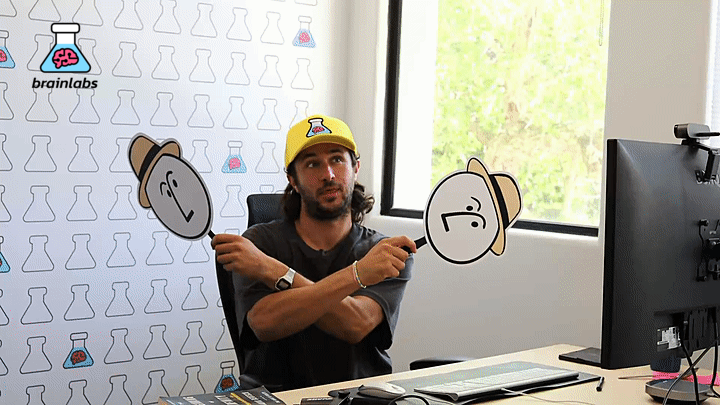
What follows is a field report. I'm Dan Gilbert, CEO of Brainlabs, a media agency of over a thousand people across NYC, London, LA, Dallas, Boca Raton, Toronto, Buenos Aires, Singapore, and Sydney. For the past six months, we've been rebuilding this company as AI-native. As of writing, at least 75% of our 1,000 people are embedded in the tools, albeit to different degrees. Some of what you'll see below is live and running in production. Some is rolling out right now. Some is planned. I'll move between those categories freely because the line shifts every day.
I'm sharing the infrastructure, the architecture, the technology choices, and the governance model so that you're not left to figure everything out by yourself. Because the alternative is worse: people going off in silos, one person using this tool, another using that, someone plugging a Mac Mini into an open-source model and sharing all their passwords, agents that die when someone leaves or gets promoted. Unsanctioned software is not an answer in a scaled organization.
Before we break it all down, let me just get you excited with a short demo of what we can already do with the right tools and setup…
There's a lot to unpack here, so we're going to build from the ground up. We'll start with the basic daily usage that makes up 99% of how we actually work. Then we'll get into the architecture, the governance, and the organizational decisions. And we'll finish with the most advanced piece: a vision for where all of this is heading, where agents are listening to meetings, triaging your inbox, and completing work before you've even assigned it.
Who This Is For
This applies to you if you're:
Outside the lofty senior titles, if you lead any department in a mid-to-large company, or you're someone who wants to lead one, this is for you. That includes even the junior employee just starting their career who has a generational opportunity to become the AI expert in their company before anyone more senior even learns what a prompt is.
A Disclaimer - this is not easy!
I personally spent many 80-plus hour weeks learning the tools, making mistakes, killing failed approaches, and figuring out what actually works at scale. So did my incredible team. We assembled a cross-functional team to help with the rollout: people from operations, technology, and leadership. But I learned the tools myself so that I could lead the team.
Why does that matter? Because the single biggest risk I see in companies trying to go AI-native is that the person leading it doesn't actually understand the tools. They have what Charlie Munger called "chauffeur knowledge": they can repeat the talking points, but they can't answer a question that wasn't in the script. You need what Max Planck had: real understanding earned through real practice.
WIP but also very advanced
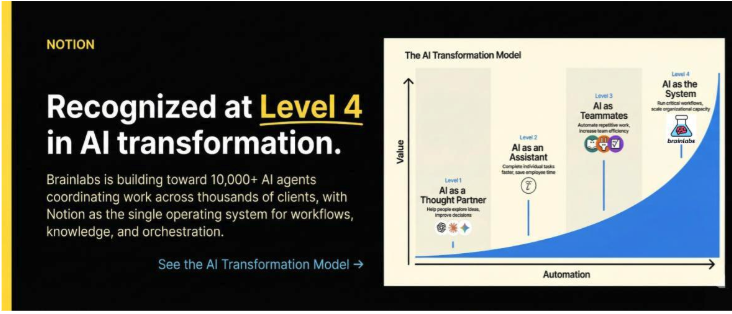
I'm sharing this mid-transformation. We're not pretending it's finished. But it's real and it's running. And while there is no Gold Medal for being the most AI-native company, we are very pleased that Notion, one of the leaders in the AI tech space, have declared us as a Level 4 AI company. World champions of AI transformation… Yay!
The Core Problem: Inspiration vs. Perspiration
There's a useful idea from David Deutsch, the physicist and maybe the smartest man alive. He separates knowledge creation into two layers.
Inspiration is the creative part: conjecture, direction-setting, judgement calls. It's the "what should we do and why?" layer. It's non-mechanical. You can't reduce it to a flowchart.
Perspiration is the execution of those judgements. It's following the rules you've already set. It's mechanical. You can absolutely reduce it to a flowchart.
Anything that can be reduced to rules can be automated. AI is extraordinarily good at perspiration. It cannot set direction. It cannot tell you whether to go north or south. But once you've said "go north," it can get you there faster and more thoroughly than any human can.
Most companies are structured backwards. Their best people spend 80% of their time on perspiration work: formatting, researching, checking, iterating, scheduling, coordinating, chasing, copy-pasting. The remaining 20% goes to actual thinking. AI flips that ratio. Your best people should spend 80% on inspiration and delegate the perspiration to machines.
I was initially slow to see this. When ChatGPT launched, I tested it once, got a mediocre result, mentally filed it away. My error correction came six months later when I watched someone on my team use it to 10x their output on work that was boring and mechanical. Within a week I had a new rule: try AI first for anything rule-based. Within six months I couldn't work without it.
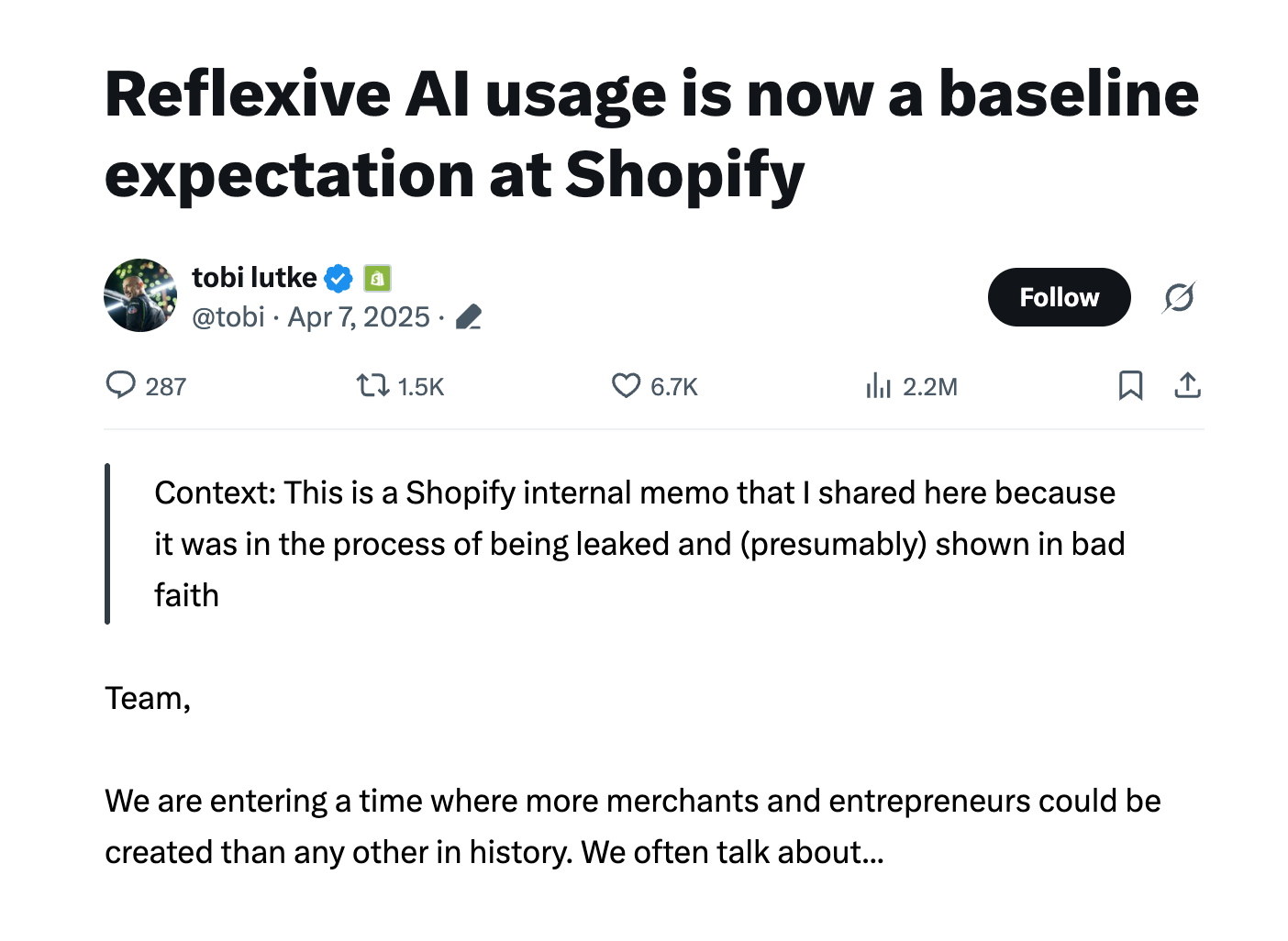
I'm not alone. Tobi Lütke, the CEO of Shopify, now requires teams to demonstrate why AI cannot do the job before they're allowed to request new headcount. Reframe that in your head. The burden of proof has flipped.
A Quick Guide to the Jargon
Before we go further, some definitions. The first time I heard most of these words, I had no idea what they meant. If you're a PE investor or a CMO reading this, you shouldn't need a glossary.
A prompt is a one-off instruction you give an AI. You type it, you get a response, it's gone.
A skill is a prompt that's been refined, tested, and saved so anyone in the company can reuse it. Prompt = ad hoc. Skill = codified.
Think of a skill like a recipe. "When you get a client email asking for a proposal, pull the client context from the database, cross-reference it with our capabilities, and draft a proposal outline in the Brainlabs style." That's a skill. It's stored as plain English, not code. Anyone can read it.
An agent is AI that can take actions, not just answer questions. A chatbot answers your question and waits. An agent reads a task, decides what to do, calls other tools, and delivers a result. I like to think of agents as junior employees. You give them clear instructions and they go carry out the work. If the instructions are really clear, they complete the work well, and they improve over time. You can't just give them vague instructions and expect great output. They don't know anything to begin with, and it takes real time and investment to get them right, exactly like it would with a junior employee.
A wrapper is the software layer that sits around the AI model and gives it memory, file access, and structure. Without a wrapper, you're copying and pasting into a chat window every time and starting from scratch. With a wrapper, the AI remembers what you told it, knows which files you're working on, and follows instructions you've set up in advance. The wrapper is arguably more important than the model itself.
Step One: Choose Your Tech Stack
Before we talk about what tools to use, let's talk about what goes wrong without a central platform(s).
If you let different teams build AI systems independently, you get fragmentation. Team A uses one model. Team B uses another. Finance builds automations in Zapier. Dev and Product is in GitHub. Marketing is somewhere nobody knows about. Every team is "doing AI." Nobody is building anything that compounds.
The real cost is threefold. First, knowledge leaves when people leave. Their agents, their scripts, their workflows: all gone. Second, nobody learns from anyone else's work. Ten teams solve the same problem ten different ways. Third, context is shattered. People have 20 tabs open, switching between tools, replicating work because they have no idea what someone else already built.
Our first step in becoming AI-native was to choose one organizational platform for where all of our AI, all of our agents, and all of our institutional knowledge would live.
Why Notion?
We evaluated a lot of options. Notion was the best for us.
1. Work already lives there. Notion is already a best in market solution for project management, task tracking, meeting notes, client information, the company wiki. It's where people decide what work gets done and track it. That makes it a natural jumping-off point for deciding which agents do what work.
2. Notion is LLM-agnostic. This was critical. Rewind one year and there was a different winner every single day. A company can't afford to bet everything on one model. With Notion as the wrapper, if Gemini is the right LLM today and something else is better tomorrow, we can switch. Notion doesn't care which model powers the agents.
3. Notion already has enterprise features we needed: permissions so people only see what they should, version history so we can track who changed what and when, audit logs, integrations with Slack and Google Calendar and everything else we use.
4. Notion is accessible. It's a table, not a repo. Everyone in the company can browse the skills database and read in plain English what every agent actually does. Anyone at any level of capability can look at an agent and understand it. This is a forcing function for clarity. If you can't explain it in a Notion page, you don't understand it well enough to automate it.
5. Notion also serves as our context layer. It contains our company information: who our clients are, how we work, what our standards are. That's a perfect pre-layer for any AI. Before an agent even starts a task, it already has access to the organizational context it needs to do the job well.
This is worth pausing on because it's the single most misunderstood thing about AI right now. Most people think the quality of AI output depends on how clever your prompt is, or which model you're using. It doesn't. The principal difference between a good result and a bad one is context. Ask an AI to "write a competitive analysis" and you'll get generic slop. Ask the same AI to write a competitive analysis while it has access to your client database, your company's methodology, your past examples, and a set of refined instructions for how your best analyst does it: you'll get something remarkably useful. The model matters less than what the model knows. This concept is sometimes called context engineering, and it's quickly becoming the real skill that separates companies getting value from AI and companies getting disappointment. Notion is where our context lives. That's why it's the foundation of the whole system.
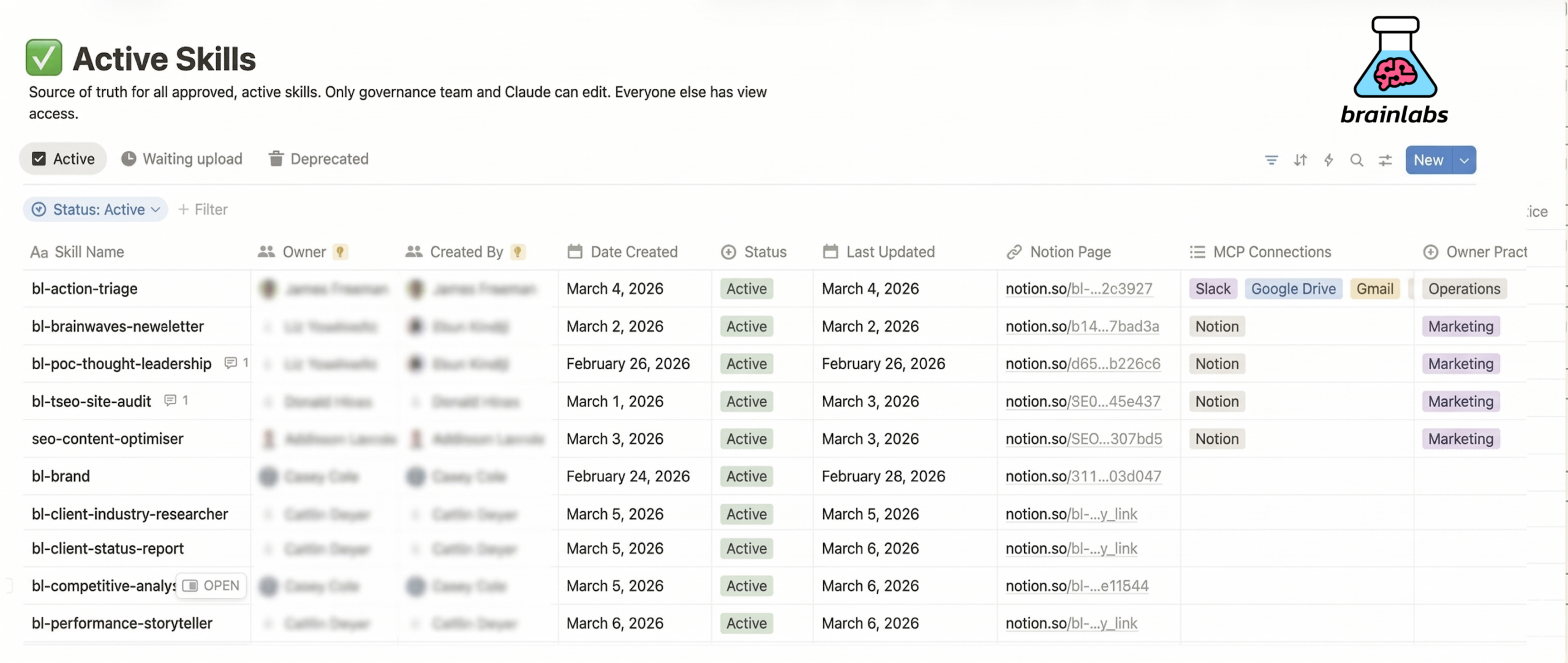
Here's a screenshot of one of our Active Skills databases. Every skill is a row. Each one has plain-English instructions, an owner, a creation date, a last-updated date, and a link to its Notion page. This is visible to the entire company. Curious about how we do competitive analysis? Look it up. Think we're doing it wrong? Improve the skill for everyone.
Why Claude?
We use different models for different tasks. Sometimes Gemini is better for something, especially as we are on Google Drive & Mail. Grok is the best for anything recent and if you want the most truth-seeking model. But when it came to choosing the primary execution layer for our AI-native infrastructure, we chose Claude, made by Anthropic. The reason is less about the model and more about the tooling Anthropic built around it.
If you've used ChatGPT or any AI chatbot in a browser, you know the experience: you type something, you get a response, and then you start over. There's no memory. No file access. No persistent instructions. Every conversation is a blank slate. That's fine for one-off questions, but it's completely useless for real work.
That tooling is different from anything else on the market. They created wrapper tools that sit around the AI model and give it the things it needs to actually function in a workplace. Here's what that means in practice: memory (it remembers what you told it across sessions), file access (it can read and write to your actual files), skill-calling (it can pull instructions from your org-wide skills library and follow them), and persistent instructions (you write down how you want it to behave and it remembers, so you're not starting from scratch every single time).
This is a monumental change. With these wrapper tools, the AI stops being a chatbot and starts behaving like that junior employee we talked about. It remembers its training. It knows where the files are. It follows the process you've defined. It gets better as you refine the instructions.
Anthropic ships two versions of this. Claude Cowork is the one most people in our company use. It looks and feels like a workspace: you open it, tell it what you need, drag in files or images, and it gets to work. If you're a marketer, an analyst, a strategist, or anyone who isn't a programmer, this is your tool. Claude Code is the command-line version. Our dev teams use it. Same underlying power, but designed for people comfortable in a terminal.
I'm a realist, not a purist. Most knowledge workers feel immediately allergic to anything that looks like a terminal, even if Claude Code can technically be operated without writing code. It was genuinely clever of Anthropic to release Cowork alongside Code as it is immediately accessible to 2 billion knowledge workers.
As of writing, Anthropic is the only company that has built wrapper tooling at this level. Other companies have built models. Anthropic built a system for models to work in the real world. That's the difference, and it's not close.
What Daily Work Actually Looks Like
This is where 99% of the value lives. Not in the flashy demos. In the daily, repetitive, high-volume work that every knowledge worker does.
I could happily do almost all of my work between Claude (Code or Cowork) and Notion. That's it. Two tools. Here's what it looks like in practice.
We have thousands of skills across every discipline: paid search, paid social, SEO, programmatic, analytics, finance, HR, IT. Every repetitive task that used to eat hours of someone's day. I'm going to walk through one example in detail so you can see how it works, but this same pattern applies thousands of times across the entire company.
Take an SEO audit. One of our SEO analysts needs to run a technical site audit for a client. Before AI, that's a multi-step process: set up a crawl, export the data, build a workbook, categorize the issues, score them by priority, create charts, write up the findings, format the deliverable. Several hours of perspiration work for every audit.
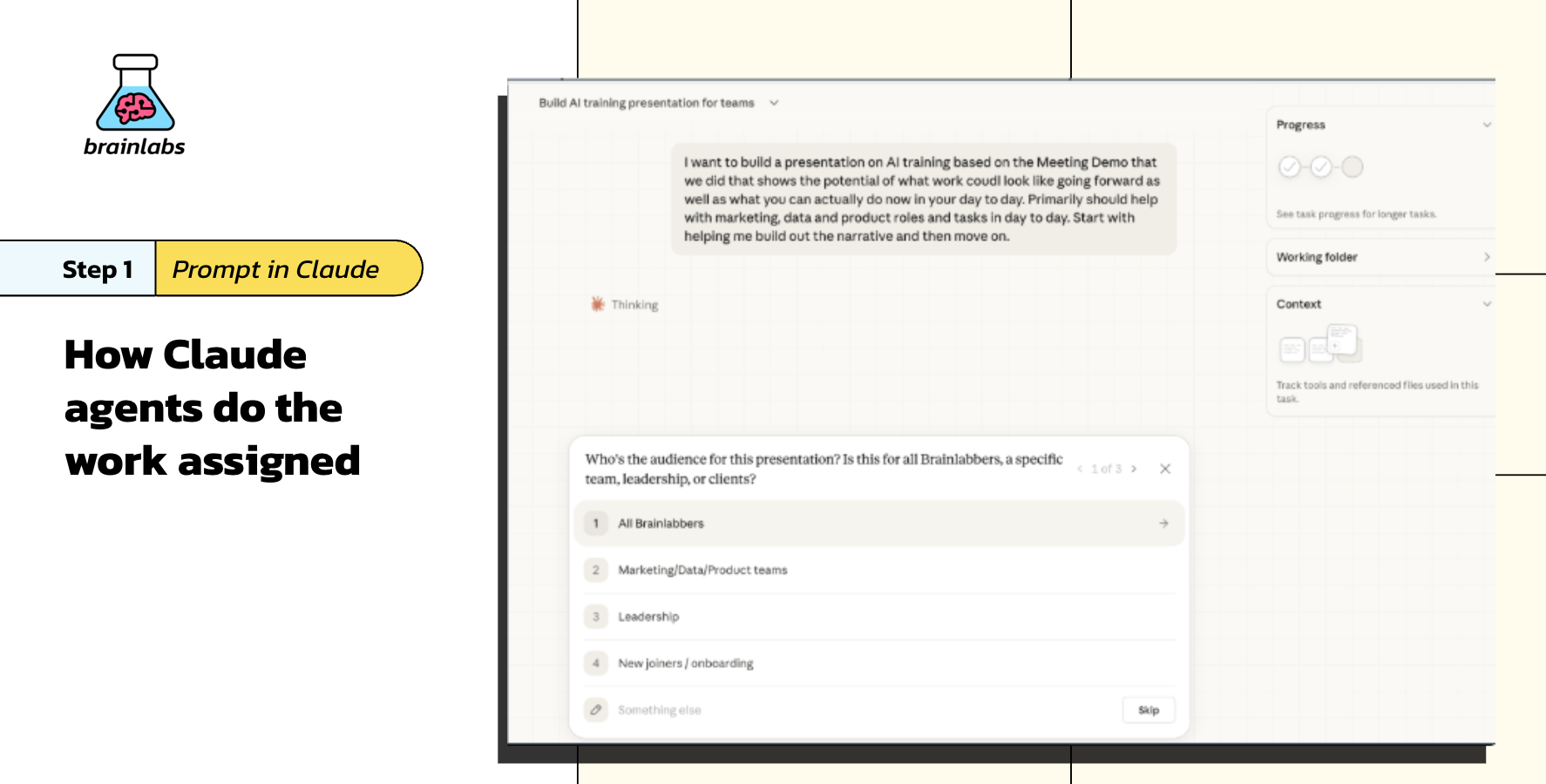
Now, the analyst opens Claude Cowork and tells it what they need. In plain English. No menu. No dropdown. No searching through a database of options. Claude understands what the analyst is trying to do and automatically identifies the right skill from our library: the technical SEO site audit skill, which has been built and refined by our best SEO practitioners over dozens of iterations. This is probably the single biggest differentiator of building on Claude. The AI doesn't just execute instructions. It understands intent.
Claude pulls that skill, follows every step, asks the analyst clarifying questions where judgement is required, and produces the deliverable. The analyst reviews the output, applies their expertise where the AI got something wrong or missed context, and ships it.
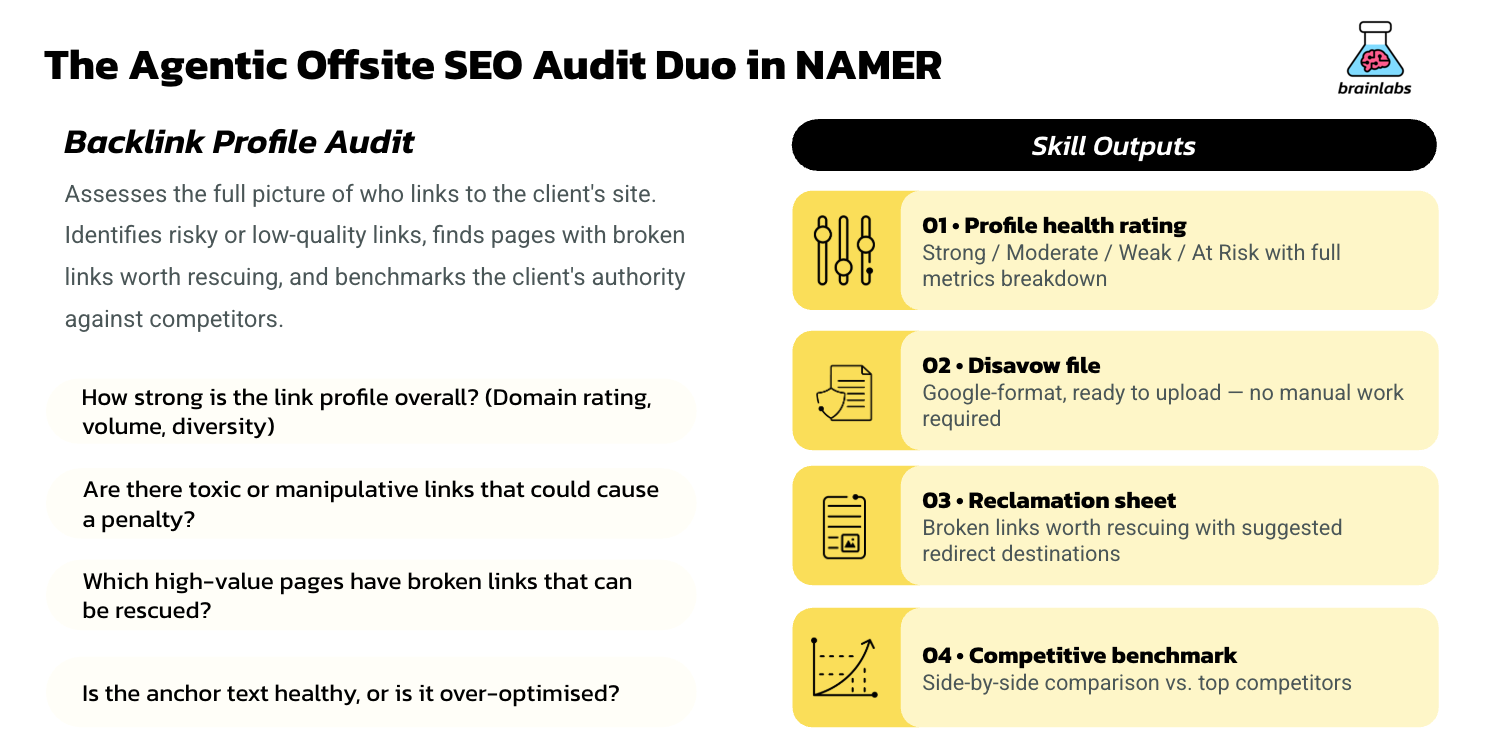
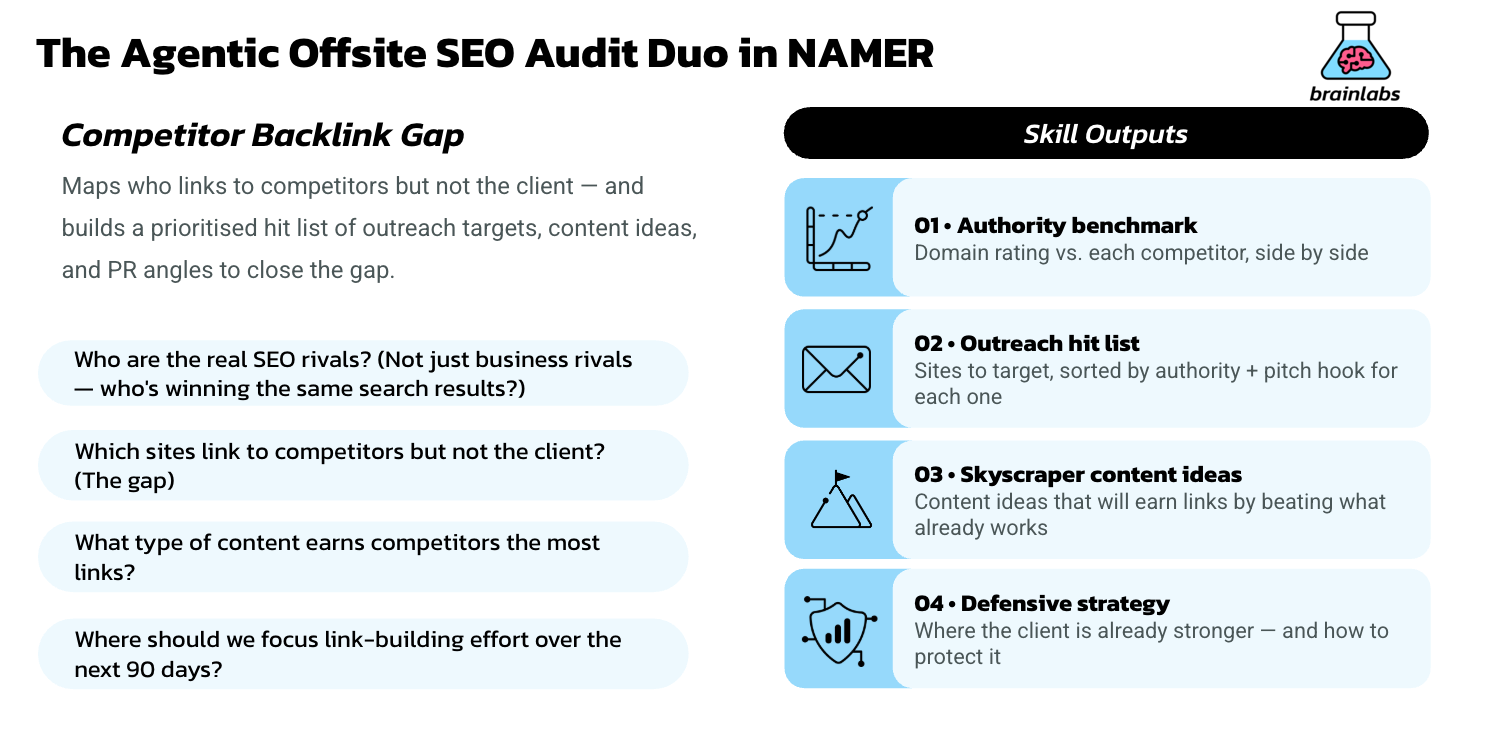
The skill doesn't live on one person's computer. It is accessible and shared across the organization for everyone to use. If someone finds a better way to prioritize issues, they suggest an update. The skill owner reviews it. If it generalizes, everyone gets the better version. The next audit is better than the last one, automatically.
This is the basic loop. Person opens Claude. Claude calls a skill from Notion. Skill runs. Person reviews and applies judgement. Output ships. The skill improves over time because everyone using it can contribute.
It works for SEO audits, competitive analyses, client reports, narrative building, budget optimizations, feedback writing, email drafting, presentation building, and dozens of other tasks we've built skills for. The pattern is always the same. The skill captures the best of how Brainlabs does that task. The AI handles the perspiration. The human handles the inspiration.
How Skills Work
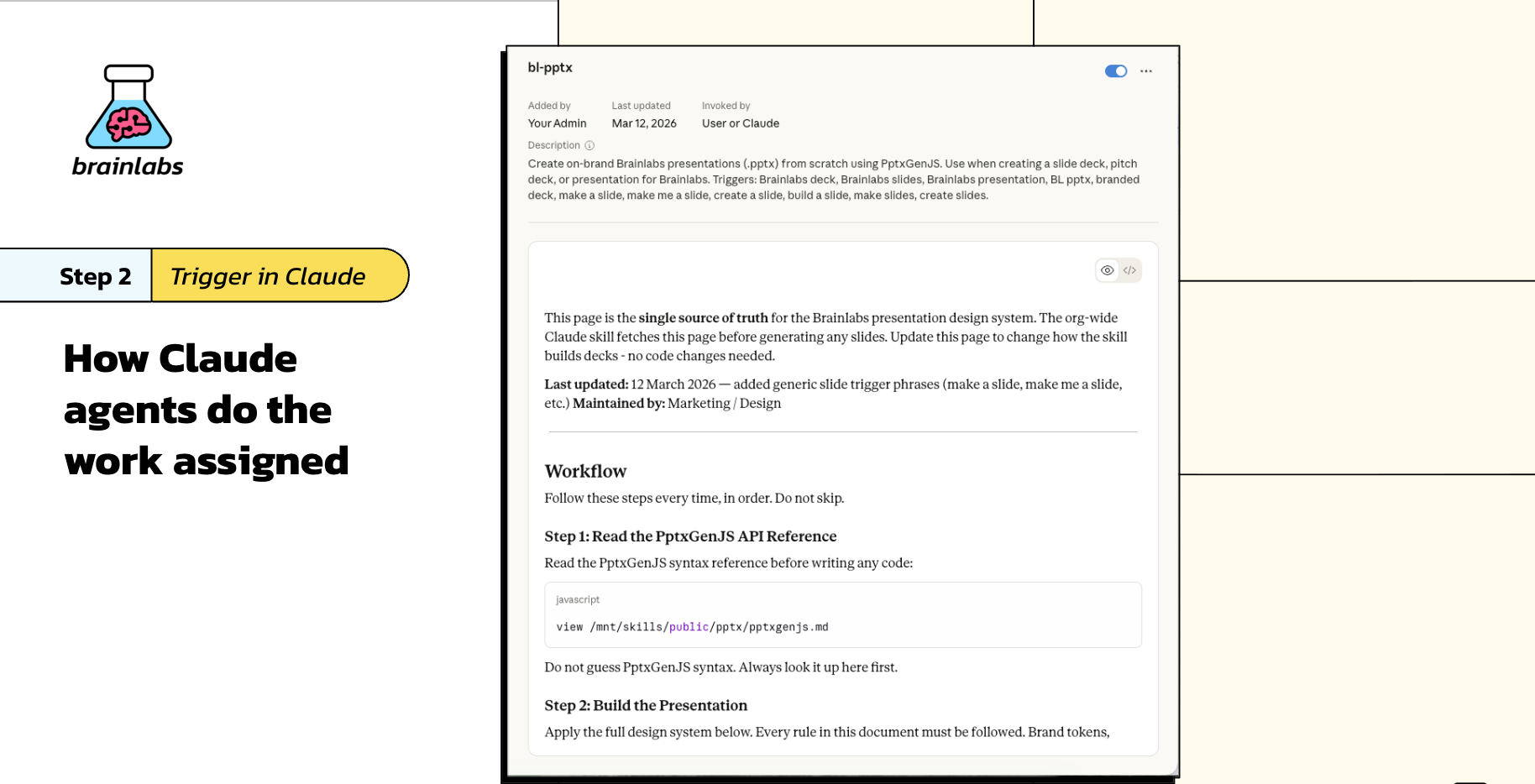
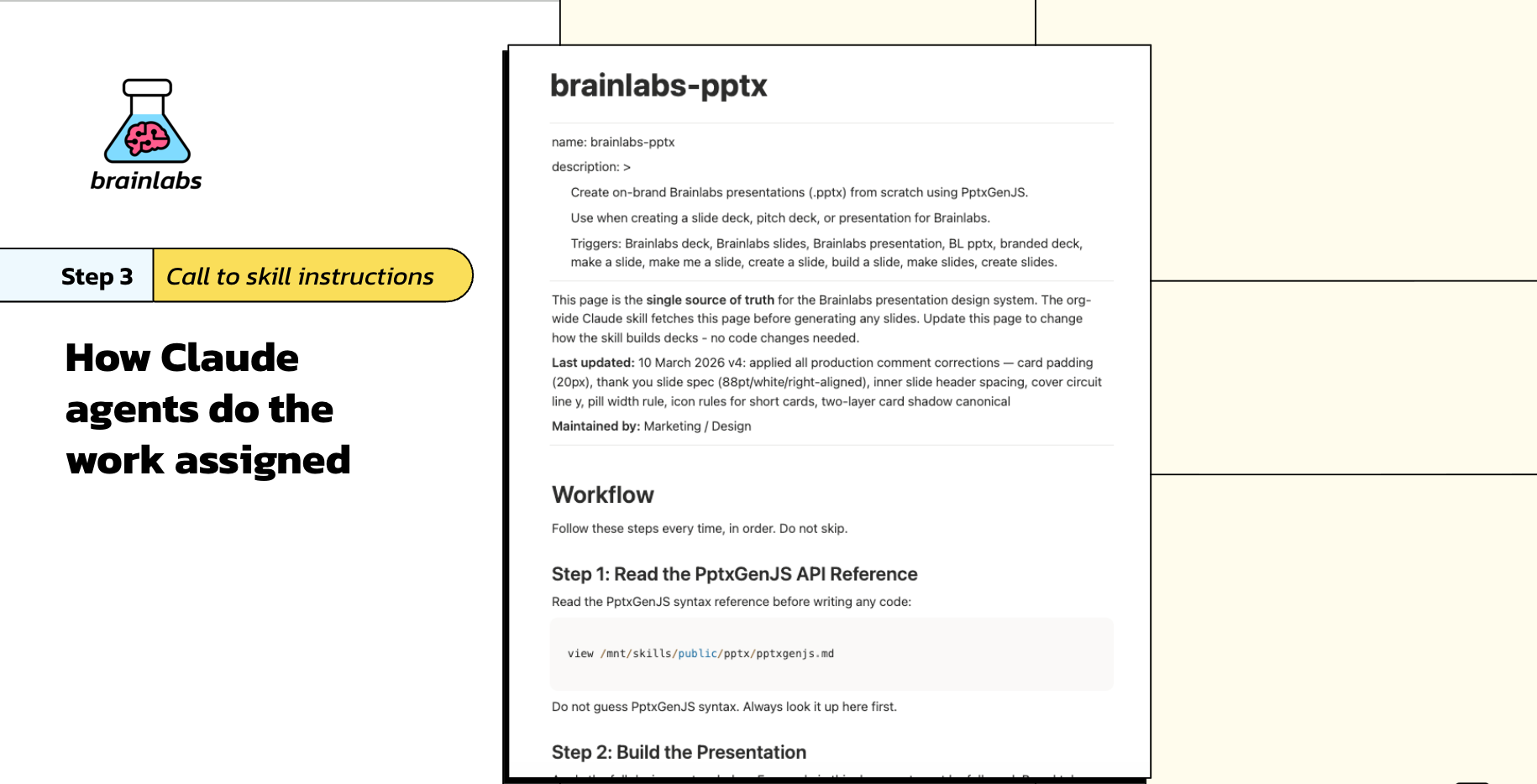
A skill is a set of plain-English instructions stored on a Notion page. Not code. Not a prompt that changes every time someone copy-pastes it. A stable, testable, improvable set of steps for how to do something.
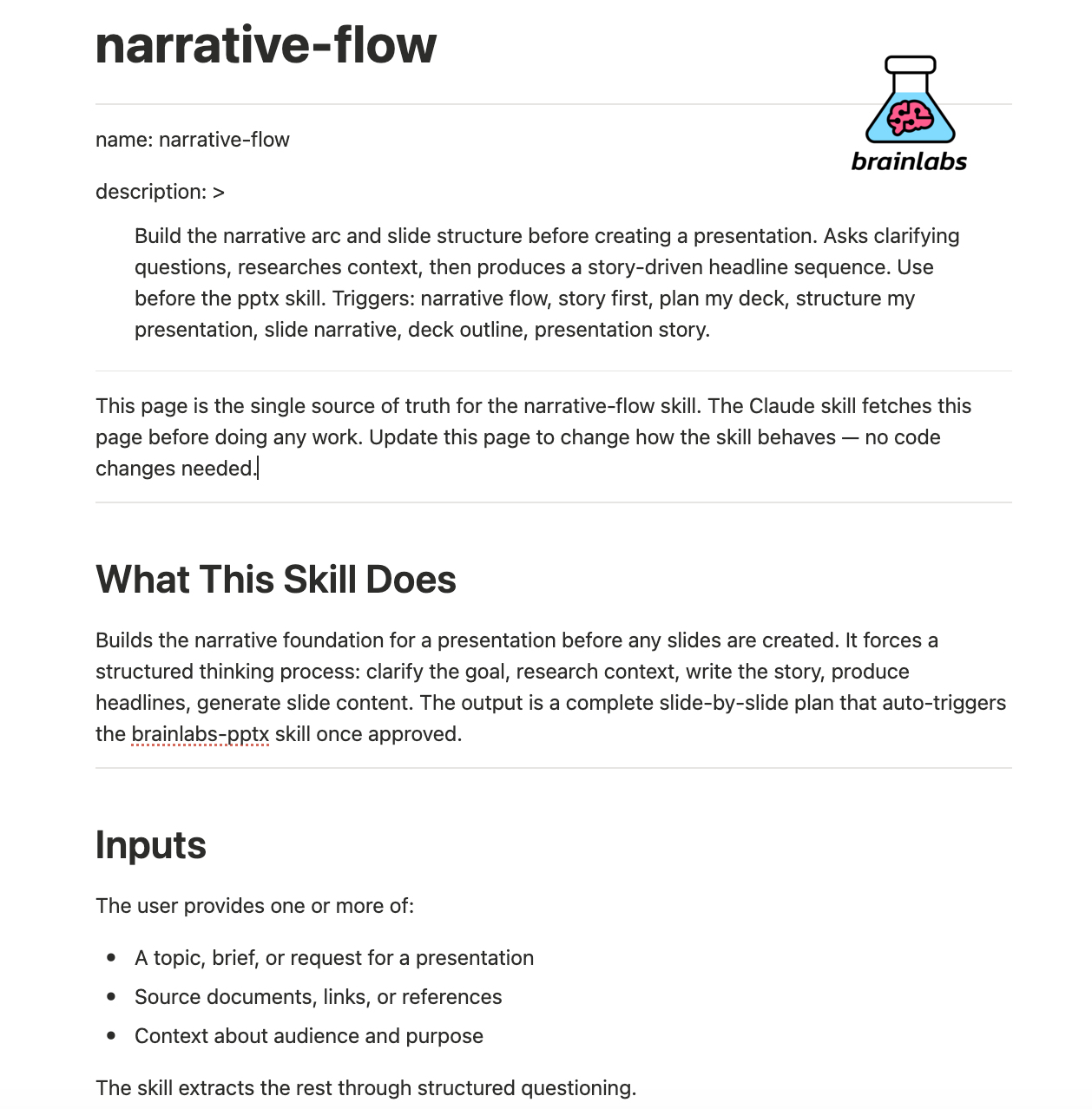
Here's what happens when a skill runs. Claude opens Cowork. The user tells it what to do. Claude identifies the relevant skill in the organization's Notion database. It pulls the latest instructions from that skill page (always the latest, always from one governed source of truth). It follows those instructions step by step. It produces the output. The user reviews it.
The skills are written so that anyone can read them. "Do this. Then do this. If that doesn't work, do this instead." Plain English. Accessible to anyone who can use a computer. That's deliberate. And here's the thing: you don't write these skills alone. You describe what you want, and Claude helps you build the skill, test it, and refine it until it works reliably. We chose Notion specifically because we wanted every person in the company to be able to open a skill and understand what it does.
The power compounds. A complex task might chain multiple skills together. A skill for writing proposals might call a skill for pulling client context, which calls a skill for formatting in the Brainlabs style. You're building a library of reusable institutional knowledge that gets better every time someone uses it and feeds back.
Why Skills Are Architected This Way: The Context Window Problem
Every AI model has a context window. That's the total amount of information it can hold in its head at any one time: your instructions, the files it's reading, the conversation so far, and whatever it's producing. Think of it as working memory. It's large, but it's finite. And when you fill it up, the quality of the output degrades. It's called context rot.
Skills solve this. Claude doesn't load every skill into memory. It loads only the names and short descriptions of all available skills. A few hundred words total. When you give it a task, it reads those descriptions, identifies which skills are relevant, and ONLY THEN loads the full instructions for those specific skills. Everything else stays out of context.
The result: you can have hundreds of skills across every function in the company, and Claude still has most of its context window available for actual work. The indexing is lightweight. The execution is targeted. The output stays sharp.
If you skip this architecture and just paste your best practice into a system prompt, you'll hit the ceiling fast. Skills aren't just a nice way to organise knowledge. They're an engineering solution to a hard constraint.
Management teams: The Trio Model
This system breaks if you don't have the right people managing the skills / agents. So we built a specific structure for managing skills at scale.
Each department has a trio of leaders responsible for their skills. The first is a domain expert: someone who works in that practice and really understands what good output looks like. They're the judge of whether an agent has produced good work. The second is a tools specialist: someone who's gone deep on Notion and Anthropic's training, knows all the features, knows where things live within the architecture. They do the heavy lifting and translation between what practitioners want and what the tools can do. The third is a technology specialist from our engineering team. They handle scale problems, because a lot of this architecture, while accessible to non-technical people, will eventually run into limitations that require proper software engineering.
Each of those three brings something different. Practitioners do the actual work and define quality, but they don't hit engineering walls because the tech person is in the room. The tech person doesn't design for use cases they don't understand because the domain expert is there.
Below the trio is a community of users. They run the skills every day in Claude Cowork. They flag when something is broken or it can be improved. They say "this skill is great but it takes too long" or "this skill misses an edge case every time." That feedback gets logged by Cowork on their behalf as a skill change request in Notion. The trio reviews it (also using Cowork) and asks one question: does this suggested change generalize across users, or is it specific to one person's situation? If it generalizes, they approve and the skill gets updated. Everyone gets the better version immediately.
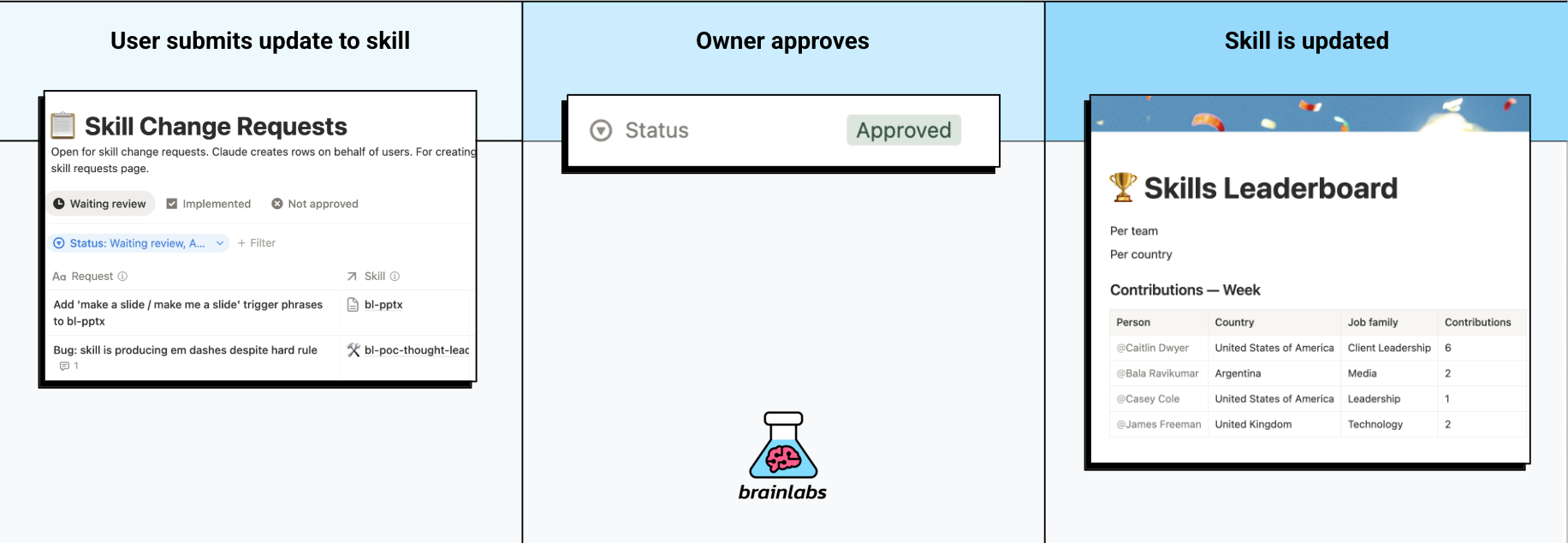
We also have a Skills Leaderboard. Which teams have contributed the most improvements? Whose skills get used the most? It's a fun way of making participation visible. You're not just using the system. You're building it. A thousand people each contributing to shared agents will always beat one person trying to build a hundred agents alone.
We think of this as building a palace, not pitching tents. A tent is an individual automation on someone's laptop that dies when they leave. A palace is shared infrastructure that gets better with every person who contributes to it.
The Architecture: How It All Connects
Now that you understand the basic daily loop (person + Claude + skill from Notion), let's zoom out to how the whole system connects.
The Factory Manager is an agent that sits inside Notion, watching a task board. When a new task appears, the Factory Manager reads its properties and routes the work to the right executor. Think of it as a dispatcher in a factory. It doesn't do the work. It decides who does.
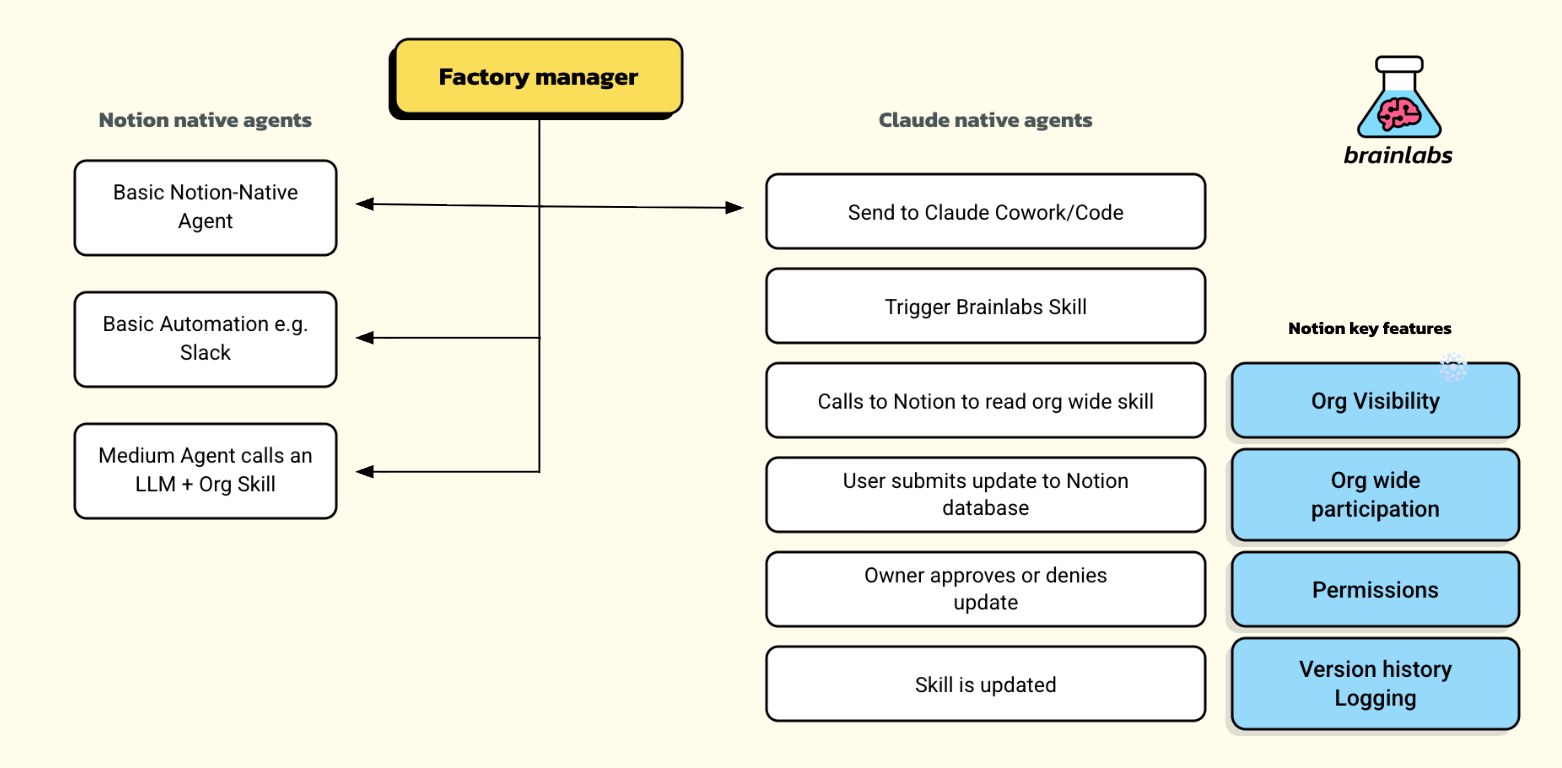
Basic Notion-native actions
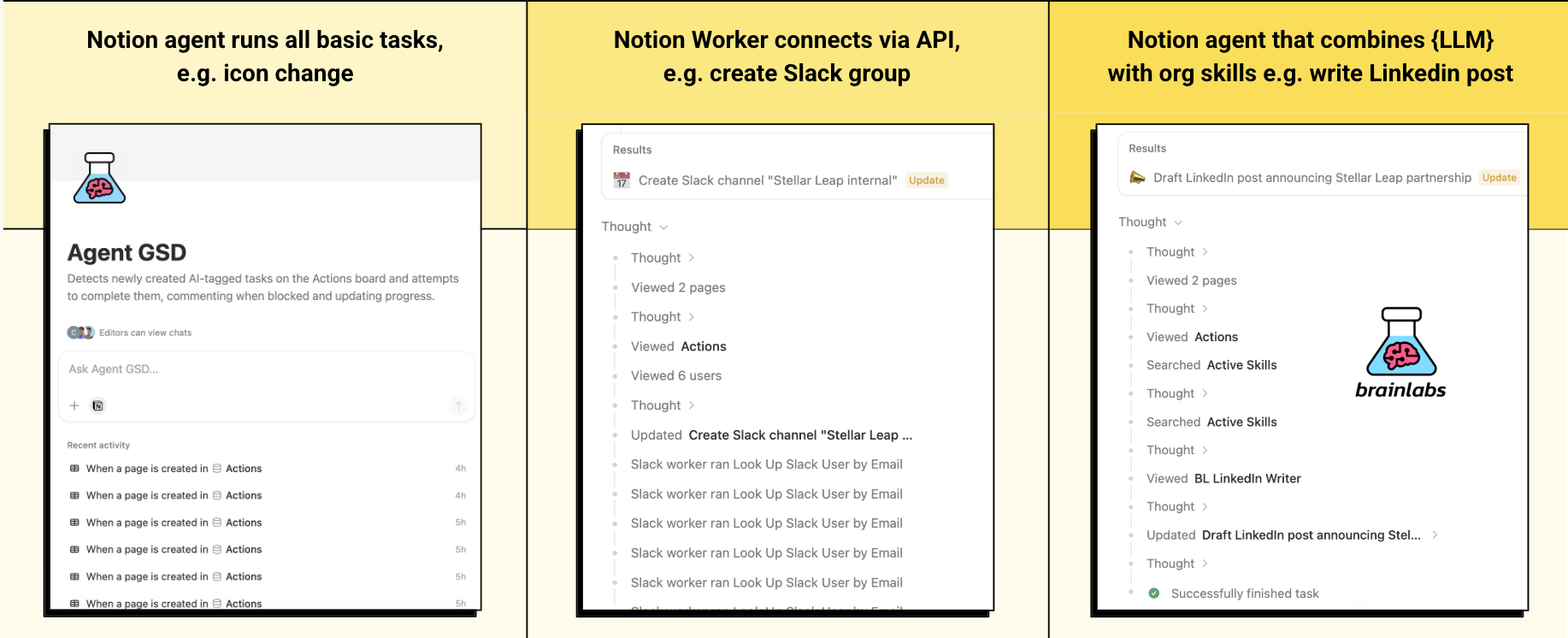
Change a board icon. Duplicate a page. Update a field. These are handled by what we call Agent GSD (Get Stuff Done), a Notion agent that can perform basic administrative tasks without leaving the Notion environment.
External integrations
Create a Slack channel. Send a calendar invite. Pull data from an external API. These are handled by Notion workers that connect to outside platforms through APIs. Still no human needed. Still no LLM needed. Just plumbing.
Complex work requiring AI and organizational knowledge
Write a competitive analysis. Draft a LinkedIn post. Optimize a budget. These call an LLM (usually Claude) paired with an org-wide skill. The agent reads the skill instructions from Notion, applies them to the specific task, and delivers the result. These skills aren't generic prompts. They've been refined through hundreds of iterations by the actual practitioners who do this work every day.
Human-in-the-loop
Strategic decisions. Novel problems. Work that requires iterating with a human. The Factory Manager creates a task in Claude Cowork. The person opens Cowork, sees their assigned tasks, picks one, and works with Claude to get it done. Claude pulls the relevant skill from Notion, follows the instructions, and the human provides the judgement and direction.
When the work is finished, Claude communicates back to Notion. The task is marked as done on the board. The person who delegated it doesn't even need to chase. The Factory Manager updates the status automatically.
Throughout all of this, Notion is the ledger. Every execution logged. Version history preserved. Permissions enforced. This is serious enterprise infrastructure. When you're working for Fortune 500 companies, you can't just vibe-code stuff on your own laptop and hope nothing breaks.
What Running This Actually Costs: Token Economics
Every action in Claude uses tokens. Reading a file, searching Slack, pulling a Notion page, running a skill, producing output. All of it. If you're going to run this across a thousand people, you need to understand what drives cost.
Token usage breaks into two parts: input (everything Claude reads) and output (everything Claude produces). Most people assume the prompt is the expensive part. It usually isn't. The cost comes from context: everything Cowork pulls in to do the job. Tell it to search all your Slack channels for anything about a project and it'll read hundreds of messages. Tell it to search one specific channel from the past two weeks and it'll get there faster, use a fraction of the tokens, and produce a better result.
That last part is the key insight: the habits that keep token use down are exactly the same habits that produce better output. Be specific about where to look. Use a dedicated folder, not your entire shared drive. Ask for the plan before it starts acting. Start a new session for a new task. Use the right tool: not everything needs Cowork.
We set generous monthly allowances. The goal is not rationing. Focused use and good use turn out to be the same thing.
Where This Is Heading: The Meeting Demo
Everything above is live and running today. Now I want to show you where it goes next, and why the architecture we've built makes this possible.
You saw this in the video above: a team meeting at Brainlabs. People talk. Actions come up. The meeting ends.
Normally, that's where things fall apart. 17 tasks captured, 5 get done, 2 take months, the rest evaporate. You've been in that meeting. You know exactly how it ends.
In this demo, the meeting recording gets transcribed automatically by a Notion agent. That transcript gets turned into structured tasks on a board. And then the Factory Manager takes over. It reads each task, decides who or what can do it, and starts routing work.
Basic tasks complete themselves in seconds. A Slack channel appears. A meeting lands in everyone's calendar. A board icon changes. Medium-complexity tasks call Claude with the right org-wide skill: a competitive analysis gets drafted, a LinkedIn post gets written using our actual marketing team's refined instructions, a budget optimization pulls from our internal tech stack.
For the tasks that need a human brain, Claude Cowork opens a session. The person provides direction. Claude handles the execution. They iterate until it's right.
The whole thing is logged. Every decision visible. Every agent execution leaves a trace. Behind the scenes, this is not magic. It's really hard work and infrastructure.
This is the end state we're building toward. Not every team is here yet. But the architecture supports it, and the pieces are falling into place.
Want the full walkthrough with the complete architecture breakdown? Here's the long version:
Who Should Lead This
Unfortunately I don't have a magic answer. I led a small but mighty team because I decided it was important enough to own. But I appreciate that I've always loved tech, and I'm also very privileged to have a great team who operate the day-to-day of the business while I spend months deep in the tools.
What I can tell you is what doesn't work. Delegating this to a traditional consultancy doesn't work because this role doesn't exist in the strategy consultancies yet. Handing it to your traditional operations team may not work because it's not an operations problem in the way they've been trained to think about it. Dropping it on your technology team doesn't work either, because the practitioners who actually do the knowledge work need to be the ones defining what good looks like.
If you're a founder, you probably need to lead this yourself at the beginning if you want it to actually work. Not forever. But long enough to understand the tools at a practitioner level, so that when someone tells you something is impossible, you can push back because you did it differently yesterday. Then you assemble your cross-functional team and scale it.
If you're looking for someone to hire for this and you want them to come pre-built: that person may not exist yet. This is a new role. You may need to build it inside your organization from the people who are already there. There are some new generation agencies emerging who are supporting companies with this kind of agentic transformation and we are working with one on non-core functions. I will update and recommend if that partnership is successful.
Training and Hiring
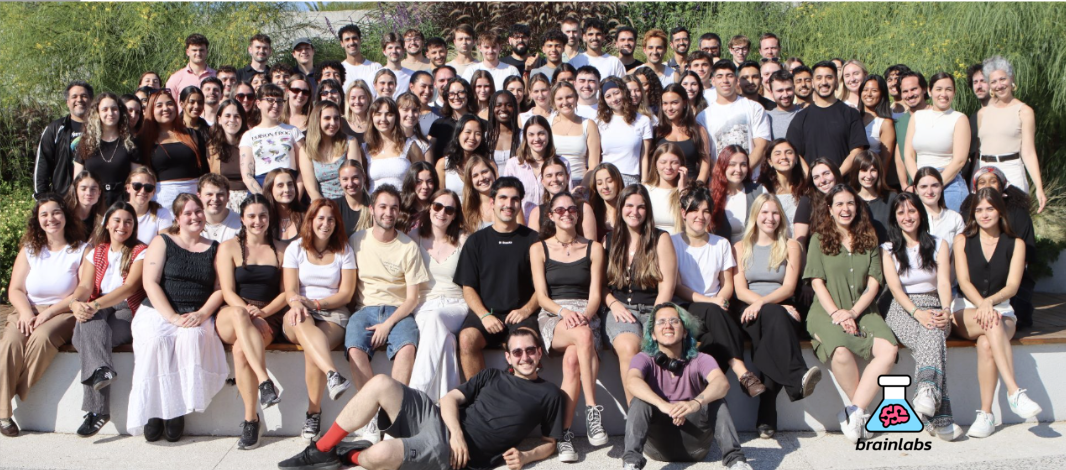
We already hire people with amazing attitudes and strong backgrounds in math, science, and engineering. The Brainlabs Academy received 5,399 applications in 2025. We accepted people who scored in the 99th percentile on math and logic tests. These are builders. They want to learn new things. They want to be at the forefront.
We've rolled out deep-dive training across all the tools: Claude, Notion, and how our architecture connects them. The training isn't "here's a product demo." It's "here's how we think about automation, here's how to write a skill, here's how to debug when something breaks, here's what not to do." The most effective sessions are the ones where people build a skill live, in the room, for a task they actually do every week. That's when it clicks.
We're rethinking every role description in the company. We're not just hiring Analysts and Strategists anymore. We're reframing new roles as Agent Orchestrators and Agent Architects. An Orchestrator knows how to manage AI systems and people together. An Architect knows how to design the right skills to solve a problem. This is what AI-native hiring looks like. (If you're a builder and want to join us, apply here!)
We've historically hired people from other companies. The feedback is consistent. "This is the first time I've seen AI woven into the operating system, not bolted on top." That's the gap. Most companies are still at "here's enterprise ChatGPT, figure it out." As ChatGPT would say: That's not a strategy — That's a subscription.
The training wasn't a webinar and a tips document. Most companies I talk to think "training" means a product demo and a PDF. We ran structured sessions across every region. Same format each time: the vision (why this stack, where it's heading), the technical layer (what Claude is, how Cowork works, what skills are), then straight into hands-on exercises. People opened Cowork on their own machines and ran a real skill within the first hour. We started simple: write feedback for a colleague, so they could see Claude searching Slack, pulling meeting context, and producing a draft. Then group work: teams identified their most repetitive tasks, described them to Claude, and built a working skill together in 20 minutes.
By the end of each session, people had configured their personal instructions, set up their Cowork preferences, and built at least one skill from scratch. Safety training was baked into the same session: how to be specific, how to give minimum access, how to review a plan before execution. We didn't separate "how to use it" from "how to use it responsibly" because splitting those sends the wrong signal.
The facilitators were the people who built the system. Not external consultants, not someone reading from a script. If someone hit a wall, the person helping them knew the answer because they designed the architecture.
We're still iterating on the format. That's exactly how it should work in a space that's changing this fast: ship, learn, improve, repeat.
Safety, Risks, and Data Governance
Any tool that can take action on your behalf carries risk. Cowork isn't just reading and displaying information. It's acting on it. That's what makes it powerful, and it's where the responsibility sits.
Three risks worth naming. Data leaks: a vague instruction can lead Cowork somewhere you didn't intend, or produce output with broader access than you planned. The fix is specificity. Loss of work: Cowork runs on your desktop, not in the cloud, so upload deliverables to Drive. Prompt injections: web pages and documents can contain hidden instructions designed to redirect the AI. Only point Cowork at sources you trust.
All of this should make you hesitant as it changes entirely the surface area of security risks. Maybe I will add to this section later with a good IT plan. But my instructions to the IT team were to actually use the new tools to actually understand what they can and can't do, in order to gain a practical understanding of likely risks rather than a theoretical one. This is the same as with Legal teams - the best teams know when reading any documents which clauses are likely to become material in the future rather than pure legalese.
On data: the rule is simple. What you'd put into Slack or Google Drive, you can put into Cowork. What doesn't go in is personal data belonging to your clients' customers: names, emails, phone numbers, CRM exports. If it could identify a real person, keep it out.
This is a new space. The tools are evolving fast, Anthropic ships updates constantly, and what's true today may shift in three months. We monitor release notes closely, review every integration before connecting it at a company level, and adjust our guidance as the landscape changes. The posture is not "set and forget." It's continuous attention, same as any critical system.
Results / Business Impact
Notion's AI Transformation Model goes from Level 1 to Level 4. As mentioned earlier, Brainlabs was recognized at Level 4: fully autonomous workflows, building toward 10,000+ AI agents coordinating work across thousands of clients, with Notion as the single operating system for workflows, knowledge, and orchestration.
It is too early to make fantastical claims just to get more views or attention. Judging the quality of AI-assisted output versus manually produced work is genuinely difficult, and anyone who tells you they've nailed it in a few months is selling you something.
What I can tell you is what we're measuring and what we're seeing.
For every skill that runs, we capture an estimate of how long that task would have taken when done manually in the past. This gives us a rolling picture of hours saved across the organization. Early signals are strong, but I'm not going to quote a number I can't defend yet. We'll share those figures when the data is robust enough to mean something.
Here's what I do know: we're a marketing agency. Hours saved don't translate into less work. They translate into more strategic work. When an SEO analyst saves three hours on a technical audit, those three hours go into deeper analysis, better recommendations, more proactive client conversations. The output per person goes up. The nature of the output changes. People spend more time on the kind of work that actually moves client businesses.
And the impact on our clients' businesses? If we're being completely serious about this: it cannot be measured in weeks. These are long-term effects. Better strategy, faster execution, more experiments, tighter feedback loops. The compound effect of all of that takes quarters to show up in performance data, not days.
I'm monitoring this closely. When we have the data, I'll share it openly. For now, the honest answer is: the early signals are very encouraging, and we're building the measurement infrastructure to prove it properly.
Are you replacing staff?
This is important, so I'm going to be direct.
MAYBE AI WILL TAKE ALL THE JOBS. MAYBE IT WON'T TAKE ANY JOBS. Both sides of this debate are loud and neither is useful. The Doomers say millions of jobs will disappear. The Deniers say relax, it will never be as good as humans. Both camps are horribly wrong.
Here's what's actually happening. Some people have irresponsibly mapped the replacement of tasks directly onto the replacement of jobs. That logic is incredibly lazy.
Some rudimentary math: if AI can replace 20% of tasks and I have a team of 5, then I can either do 20% more work (grow output by 20%) or remove 20% of the workforce (one person). This is not always straightforward, I know. But given the choice, I'm growing 20% without adding headcount. Every business owner I know thinks the same way.
Every major technology shift in history created more jobs than it destroyed. The printing press. The industrial revolution. The internet. The Doom is completely overblown.
But the doom might be very useful for one thing: scaring people into actually learning the tools. Because that part is required. AI won't replace you. Someone who uses AI well might.
What you've seen in this article is not about replacing people. It's about removing the work that isn't really work: the coordination, the chasing, the formatting, the copying and pasting. And giving people back their time for the work that actually matters: thinking, creating, making judgement calls, solving problems that haven't been solved before.
I can help anyone 10x their output with these tools. With good judgement, even more so.
How to Think About the Phases
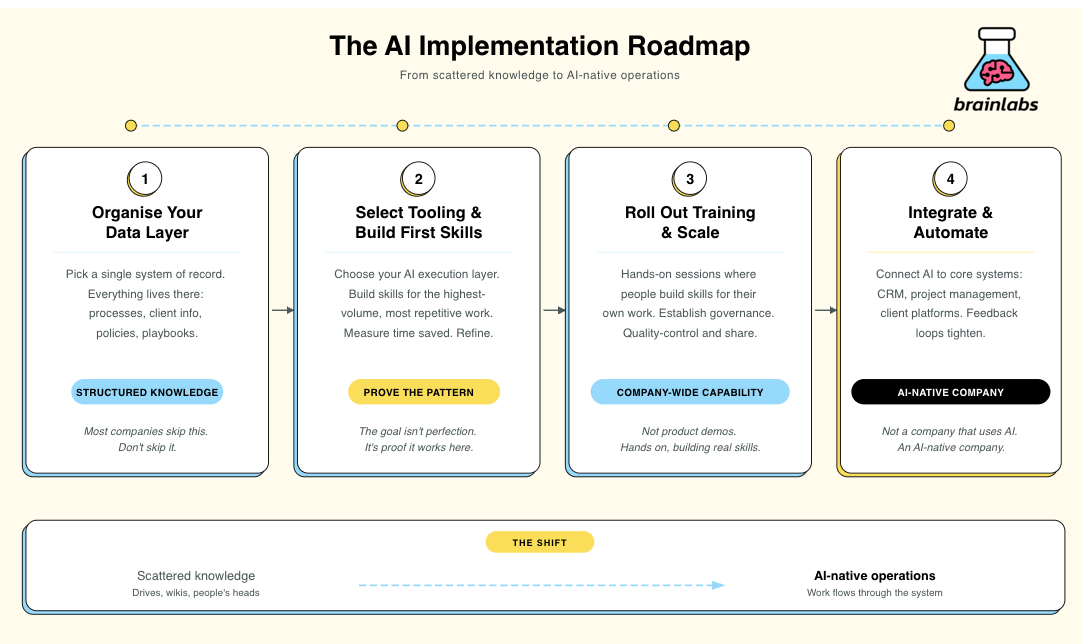
There's no universal timeline here. A 50-person company could move through these phases in weeks. A 5,000-person company might take a year. The sequence matters more than the speed.
Before you can build anything, your company's knowledge needs to live somewhere structured and accessible. Pick a single system of record. For us that's Notion. Everything: processes, client information, policies, playbooks. If your knowledge is scattered across drives, wikis, and people's heads, AI has nothing to work with. This is the unglamorous phase that most companies skip. Don't skip it.
Choose the AI platform that will serve as your execution layer. Build skills for the highest-volume, most repetitive work first. Get early adopters using them daily. Measure time saved. Refine. The goal isn't perfection. It's proving the pattern works in your environment.
Once the pattern is proven, train the wider organisation. Not product demos: hands-on sessions where people build skills for their own work. Establish governance so skills are reviewed, quality-controlled, and shared. This is where adoption goes from pockets of enthusiasm to company-wide capability.
Connect your AI layer to your core systems: CRM, project management, client platforms, internal tools. At this point, work starts flowing through the system with less human intervention at the routing level. Feedback loops tighten. You're operating as an AI-native company, not a company that uses AI.
This isn't a project with a go-live date. It's a permanent shift in how your company works. The companies that move first will compound their advantage every month.
The new world of work
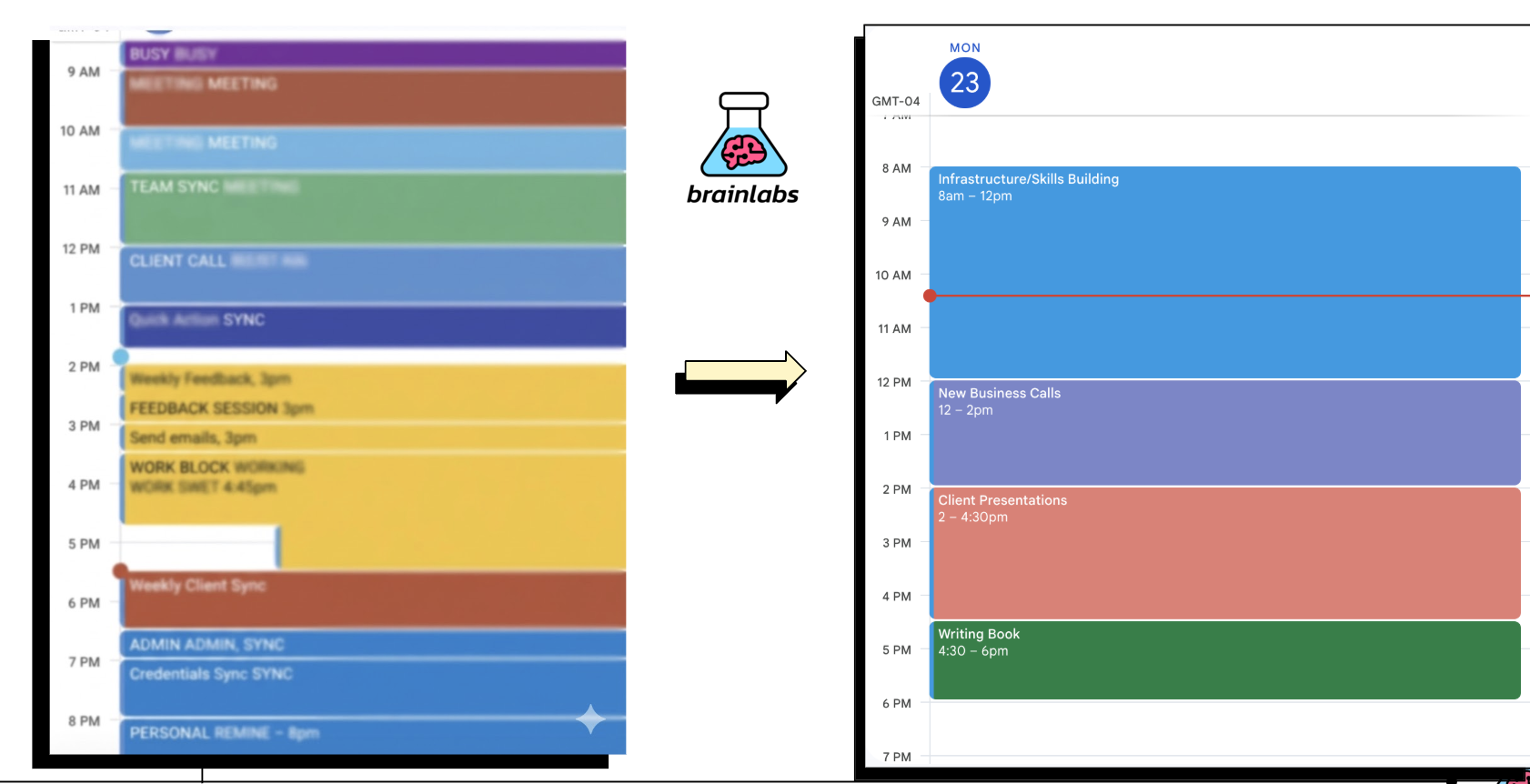
My calendar before: wall-to-wall meetings from 5am to 7pm. Meeting after meeting after meeting. At some point you have to ask: when does anyone actually do any work?
My calendar now: more focused blocks. Infrastructure and skills building in the morning. New business calls over lunch. Client presentations in the afternoon. Writing in the evening. Everything else is handled. The not-really-work work has disappeared.
What You Should Do Now
You can do this. Your stack might be different. Your industry might require different routing logic. But the pattern applies: one platform, one set of skills, one governance model, one feedback loop. Inspiration stays human. Perspiration gets automated.
My advice is simple. Sign up for Notion. Learn Claude (Cowork if you're not technical, Code if you are). Different LLMs have different strengths, but the wrapper tools that Anthropic has built are in a different league. Anthropic Academy is the cleanest starting point I've found and it's free. But make no mistake, that's the theory test. Like learning to drive, you still need to get behind the wheel. The only way to get good at AI is to use it. Play around with it. Put a basic prompt in and see what it can do. And do not give up after attempt one, because you will fall behind people who work this way.
Someone who can automate half of their boring work is going to be way more efficient than someone who keeps doing it manually. Plus, it means you can do the best work of your career.
Just get on with it.
People I Like Following
The best AI content right now is coming from people who are actually doing the work, and most of them are posting on X not Linkedin. Here's who I follow and have learned from:
- Greg IsenbergCEO of Late Checkout. Builds internet businesses and shows what's working with AI in real time.
- Corey HainesBuilt marketing skills for Claude Code. One of the few marketers who actually builds with the tools instead of just talking about them.
- Ole LehmannThe AI Solopreneur. Shows what one person can do with these tools when they go all in.
- Aaron LevieCEO of Box. One of the few enterprise CEOs who genuinely understands AI at a technical level and posts about it constantly.
- Tobi LütkeCEO of Shopify. Already mentioned above. Leading from the front.
- Aakash GuptaWrites the biggest AI product management newsletter. Research-backed, not vibes.
- Vas MozaFormer Meta AI, now building Varick AI. Sharp technical takes.
- Matt ShumerCEO of OthersideAI. His essay "Something Big Is Happening" is one of the best things written about AI in the last year.
And obviously the CEOs of the AI companies:
- Dario AmodeiCEO of Anthropic, the company behind Claude
- Boris ChernyHead of Claude Code at Anthropic. Built the wrapper tools I've been raving about in this article.
- Sam AltmanCEO of OpenAI
- Demis HassabisCEO of Google DeepMind
- Andrej KarpathyFounding member of OpenAI, former Tesla AI director, now building Eureka Labs. His tutorials and talks are the best way to actually understand how these models work.
- Jensen HuangCEO of NVIDIA. Building the infrastructure layer that all of this runs on.
- Elon MuskCEO of too many things to list
One More Thing
The human judgement layer that sits on top of all of this: knowing when to trust the output, when to override it, how to set direction, how to error-correct fast: that topic is so important and so dense that I wrote a whole book about it.
It's called Don't Be a Midwit: How to Learn Good Judgement So That AI Doesn't Replace You. Here's a link to sign up to be notified when it's released!
Read the Back Cover
AI is coming for ALL THE JOBS. Programmers, Lawyers, Accountants, Marketers, Middle Managers, Seniors, Juniors… Yikes! What else can you do? Well, start by learning the AI tools so you don't become irrelevant and unemployed.
After that, the only thing AI can't replace is good judgement. This is not a book about how to use AI. It's about thinking well enough that AI works for you, not the other way around.
61,587 books on Amazon about how to lead. 11,956 on how to hire. 3,894 on workplace communication. 2 gazillion LinkedIn posts every day. Noise from people who've never run anything telling you how to run everything. The consultants, professors, advisors, Influencers, conference speakers: mostly Midwits.
Ignore all the noise and stop reading business books. This is the last one you'll ever need. You don't even need to read the whole thing. Just look up a chapter and use it as a reference to spare yourself the Midwit noise. Or flip through the pictures.
I probably shouldn't have written this as I'm busy running a company and trying to be awesome. But someone had to wage war on the Midwits.